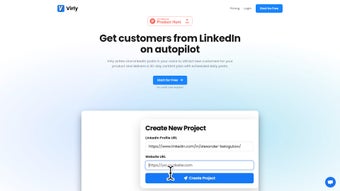

Download Virly – AI‑Powered LinkedIn Content Planner & Scheduler
Overview
Virly is an AI‑driven writing assistant built specifically for LinkedIn professionals who want to stay visible without spending countless hours drafting posts. By analysing your historic LinkedIn updates, blog articles, and website copy, Virly learns your unique voice and automatically creates a 30‑day content calendar packed with daily posts. The platform not only writes the copy but also schedules each update, sends you reminder emails, and lets you manage multiple LinkedIn profiles or company pages from a single dashboard.
Whether you’re launching a new product, sharing industry insights, or sparking conversation with a question, Virly tailors every piece to match your brand tone and audience expectations. The subscription model includes API access and collaboration tools, making it a versatile solution for solo entrepreneurs, marketing teams, and agencies alike. By handling the heavy lifting of content creation, Virly frees you to focus on networking, lead generation, and growing your business while maintaining a consistent, high‑quality LinkedIn presence.
Key Features that Set Virly Apart
- AI‑generated daily LinkedIn posts based on your personal writing style.
- 30‑day pre‑planned content calendar with automatic scheduling.
- Smart email reminders to keep you informed about upcoming posts.
- Multi‑profile and multi‑business management from one interface.
- Collaboration workspace for teams, including role‑based permissions.
- Full API access for custom integrations with CRM, analytics, or other tools.
- Content variety: product launches, industry news, thought‑leadership, polls, and questions.
- Performance analytics that show likes, comments, and engagement trends.
- Secure cloud storage with GDPR‑compliant data handling.
- Regular AI model updates to keep the language fresh and relevant.
Each feature is designed to remove friction from the content creation pipeline. The AI engine continuously refines its output by comparing generated drafts with your most successful past posts, ensuring higher engagement rates over time. Scheduling is fully automated: once a post is approved, Virly queues it for the optimal time slot based on your audience’s activity patterns. The collaboration module allows teammates to review, edit, or approve content before it goes live, preserving brand consistency across multiple LinkedIn pages. For developers and tech‑savvy marketers, the open API makes it possible to pull post data into dashboards, trigger content generation from other platforms, or embed Virly’s capabilities into bespoke workflow tools.
Installation, Setup, and Compatibility
Getting Started in Minutes
Virly is a web‑based SaaS solution, so there is no traditional “installation” required on your local machine. To begin, visit the official Virly website, click the Sign Up button, and complete the short registration form. After verifying your email address, you’ll be taken to the onboarding wizard where you can connect one or more LinkedIn accounts using OAuth authentication. The wizard also prompts you to import past LinkedIn posts or provide a link to your website, allowing the AI to analyze your existing content style.
Step‑by‑Step Usage Guide
- Connect LinkedIn Profiles: Use the “Add Profile” button, select your LinkedIn page, and grant Virly publishing permissions.
- Upload Sample Content: Drag‑and‑drop a CSV of your recent posts or paste URLs to let the AI learn your tone.
- Generate Calendar: Click “Create 30‑Day Plan”; Virly instantly produces a draft calendar with post copy, hashtags, and suggested images.
- Review & Edit: Use the inline editor to tweak any post; the AI will retain the changes for future drafts.
- Schedule & Automate: Approve the schedule; Virly auto‑publishes at the optimal times and sends you reminder emails.
- Monitor Performance: Access the analytics tab to track likes, comments, and reach for each post.
Supported Operating Systems
Because Virly runs entirely in the cloud, it is compatible with any modern operating system that supports a web browser—Windows 10/11, macOS Ventura and later, Linux distributions, as well as mobile platforms such as Android 12+ and iOS 15+. The responsive design ensures a seamless experience on desktop, tablet, or smartphone, allowing you to manage your LinkedIn strategy on the go.
Pros, Cons, Frequently Asked Questions, and Final Verdict
Pros
- Automates an entire month of LinkedIn content, saving hours of manual writing.
- AI adapts to your personal voice, delivering authentic‑sounding posts.
- Built‑in scheduler and email reminders eliminate missed publishing windows.
- Supports multiple profiles and businesses, ideal for agencies and freelancers.
- Collaboration tools and API access enable integration with existing workflows.
Cons
- Subscription cost may be a barrier for very small solo entrepreneurs.
- Reliance on AI means occasional off‑tone drafts that need human review.
- No native desktop app; users must be online to access the platform.
- Advanced analytics are only available on higher‑tier plans.
FAQ – Your Most Common Questions
Can Virly post to LinkedIn groups as well as personal pages?
Yes. During the account connection step you can grant Virly permission to publish in both personal profiles and LinkedIn groups that you manage.
How does Virly ensure my data is secure?
Virly uses end‑to‑end encryption, stores data on GDPR‑compliant servers, and never shares your content with third parties without explicit consent.
Is there a free trial available?
Virly offers a 7‑day free trial that includes full access to the content planner, scheduler, and AI generation features. No credit card is required to start the trial.
Can I export the generated content to a CSV or PDF?
Yes, the platform provides an export button that lets you download the entire 30‑day calendar in CSV or PDF format for offline review.
What happens if I want to cancel my subscription?
You can cancel at any time from the account settings page. Your data will be retained for 30 days after cancellation, allowing you to export any content you wish to keep.
Final Verdict – Should You Download Virly?
In today’s fast‑paced professional landscape, maintaining a steady stream of high‑quality LinkedIn content is a competitive advantage. Virly delivers on its promise by combining AI‑generated copy with an intuitive scheduling engine, making it a compelling choice for anyone who wants to amplify their personal brand or manage multiple company pages without the daily grind of content creation. While the subscription fee may feel steep for ultra‑tight budgets, the time saved—often several hours per week—quickly offsets the cost for most users. If you’re serious about growing your LinkedIn influence, boosting engagement, and freeing up mental bandwidth for strategic work, Virly is a worthy investment.
Ready to experience AI‑powered LinkedIn mastery? Download Virly now and start your free trial today. Let the platform handle the posting while you focus on building relationships and closing deals.



.png)



